Personal Security
Lost or Stolen Laptop Response Plan: Lock, Locate, Revoke, or Wipe
A cautious response plan for a missing personal laptop: preserve evidence, use vendor controls, revoke account access, assess encryption, and choose whether to erase.
- Use source-backed steps before changing security settings.
- Prioritize MFA, updates, backups, segmentation, and phishing-resistant habits.
- Save only the guides you need; no account is required.
A missing laptop creates two incidents at once: a physical-property loss and a possible account-and-data exposure. Treating it only as a search problem can leave active browser sessions, synced files, and saved credentials unattended. Treating it only as a data breach can lead to an impulsive erase that removes a useful recovery channel. The safer response is staged: confirm the facts, preserve useful evidence, use vendor controls from a trusted device, contain accounts, then make an explicit lock-versus-wipe decision.
This guide is for a personally owned Windows laptop or Mac. A Chromebook or Linux laptop can still use the account-containment and evidence steps, but remote-device controls vary. If the computer belongs to an employer, school, client, or regulated organization, contact its security or IT channel immediately and follow policy. Do not remotely erase a managed computer unless the authorized response owner tells you to. If a location appears at a private address, there is violence or extortion, or someone asks you to pay for return, do not confront them; contact local law enforcement from a safe place.
The first 15 minutes: establish control without destroying evidence
Use a different, updated phone or computer. Ideally it was not in the same bag and does not share an unlocked browser profile with the missing laptop. Reach vendor pages through a saved bookmark or by typing the known domain, not through a text message claiming that the device was found.
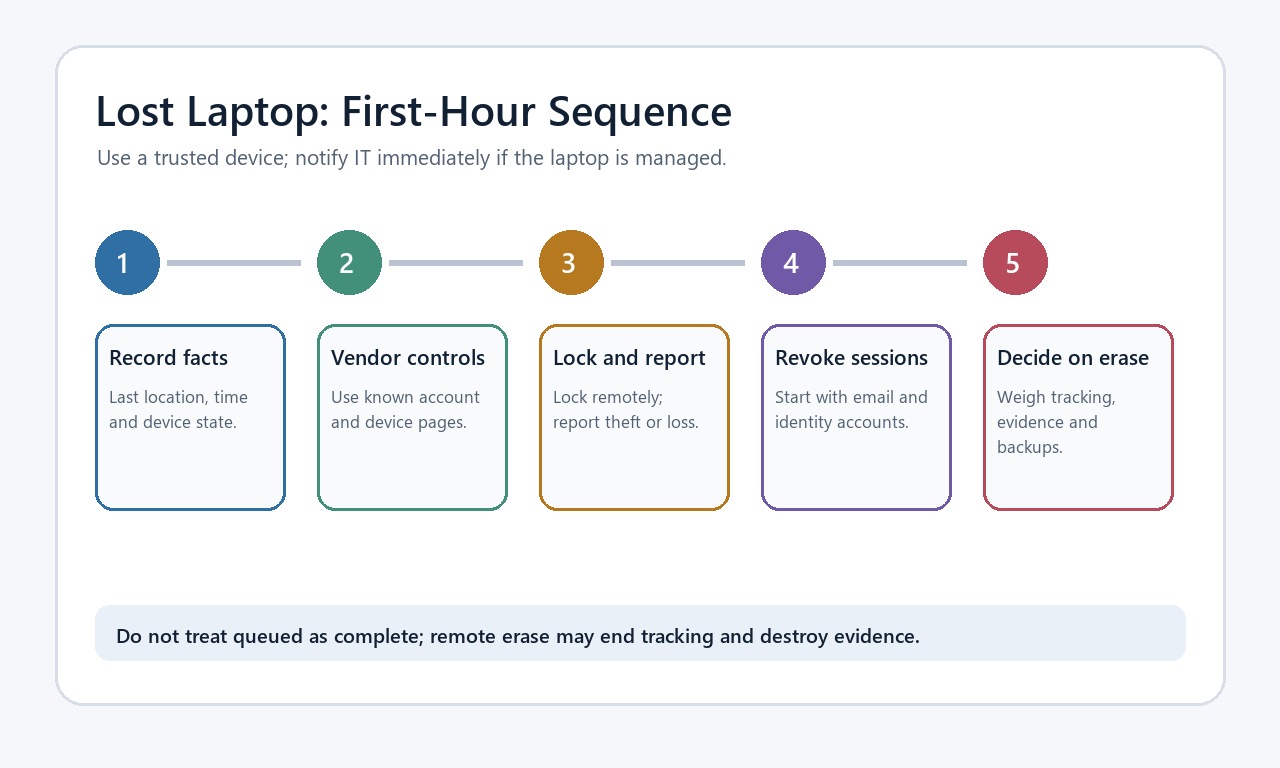
- Write down the last known facts. Record when and where you last controlled the laptop, whether it was awake or shut down, who had legitimate access, and which bag, charger, storage devices, or security keys are also missing.
- Preserve identifiers. Find the serial number, model, purchase record, asset label, and insurance details from the original order, packaging, account portal, or inventory. Do not publish the serial number on social media.
- Capture vendor status. Screenshot the device name, last-seen time, approximate location, battery or connectivity state, and the action you request. Preserve the time zone. A queued command is not proof that the device received it.
- Report the physical loss. Contact the transit operator, venue, hotel, airline, or local lost-property office using a verified channel. For suspected theft, make a police report and retain the case number. Apple and Microsoft both note that law enforcement may request a serial number (Apple; Microsoft).
- Tell the right people. If shared accounts, family documents, client material, or a work identity were accessible, notify the appropriate owner without speculating about a culprit.
Do not keep refreshing a map while ignoring active accounts. Location is one evidence point, not identity proof, ownership authority, or permission to enter property.
Use the operating-system control that was already enabled
Remote controls generally must have been configured before the loss. They also depend on power, connectivity, account state, and platform requirements.
Mac: Find My, Lost Mode, and erase
Apple says Find My can show an approximate location, play a sound, place a supported Mac in Lost Mode, or request a remote erase if Find My Mac was enabled before the loss. Locking or erasing requires the Mac to be powered on and connected to the internet, although some location information may still be available while it is offline. Crucially, Apple warns that after a Mac is erased, it can no longer be located with Find My (Apple’s lost-Mac procedure).
That creates a real tradeoff. A lock is usually the first reversible containment action when recovery remains plausible. An erase is a stronger confidentiality action when recovery is unlikely or the exposed data is exceptionally sensitive, but it can remove tracking. Record whether the service says pending, locked, erased, or offline rather than assuming a click completed.
Windows: Find My Device and remote lock
Microsoft’s consumer Find My Device feature applies to Windows 10 and Windows 11, requires a Microsoft personal account, and must have been enabled in advance. The account needs administrator status and device location must be on. From the Microsoft device dashboard, an owner can attempt to locate and remotely lock a listed device (Microsoft Support). Microsoft’s consumer page describes locate and lock, not a general remote-wipe promise. Do not install a third-party “remote wipe” utility after the laptop is gone and expect retroactive control.
Chromebook, Linux, and unsupported devices
For an unmanaged Chromebook or Linux laptop, do not assume a Mac- or Windows-style consumer remote erase exists. Start with the primary account’s device/session page, revoke active access, and inspect any management or anti-theft service deliberately configured before the incident. Google’s account device page shows recent devices and sessions and lets a user sign out a lost device; multiple sessions with the same device name may need separate review (Google Account Help). Signing out of Google does not erase local files or prove every other provider session was revoked.
Lock, wait, or wipe: a defensible decision table
| Condition | Lock and monitor briefly | Escalate toward erase | Why |
|---|---|---|---|
| Likely left at a controlled venue; recent location matches | Yes, while contacting verified lost property | Not yet, unless sensitivity demands it | Recovery is plausible and tracking may help |
| Confirmed theft or location moves unexpectedly | Lock, preserve evidence, contact police | Consider after account containment and backup checks | Physical recovery is less certain; confrontation is unsafe |
| Encryption confirmed; strong login password; lid closed or device off | Usually reasonable for a bounded period | Still consider for regulated data | Encryption reduces offline exposure but does not revoke cloud sessions |
| Encryption off, unknown, or laptop may have been awake and unlocked | Lock if available; treat accounts and files as exposed | Stronger case for supported erase | Local data and active sessions may be reachable |
| Only backup is on the missing laptop | Preserve recovery options while checking copies | Delay unless confidentiality outweighs data loss | Erase may destroy the only copy |
| Employer, school, legal hold, or incident-response duty applies | Follow the authorized responder | Only on documented instruction | Evidence duties may override personal preference |
Use a simple exposure score to order decisions, not to predict compromise. Give 0–2 points for each factor: device likely unlocked, encryption absent or unknown, sensitive local data, high-value active sessions, and recovery unlikely. A laptop shut down (0), confirmed encrypted (0), holding ordinary files (1), with a few signed-in accounts (1), at verified lost property (0) scores 2/10. A laptop taken while awake (2), with unknown encryption (2), tax and client files (2), email and password-manager sessions (2), and confirmed theft (2) scores 10/10. This is only a triage aid: active financial loss, credible danger, or an organizational incident requires immediate escalation regardless of total.
Encryption changes data-at-rest risk, not every risk
Full-disk encryption is most valuable when the computer is shut down and the key is not available to the person holding it. NIST’s storage-encryption guide distinguishes full-disk, volume or virtual-disk, and file/folder encryption, all intended to reduce unauthorized access to stored information (NIST SP 800-111). That protection does not automatically close an unlocked desktop, revoke web sessions, remove synced cloud data, or protect secrets copied to an unencrypted external drive.
On modern Macs with Apple silicon or a T2 Security Chip, Apple says data is encrypted automatically; enabling FileVault adds protection by requiring a login password before data can be decrypted or accessed. On older Macs, FileVault must be enabled to encrypt the data. Apple also stresses keeping a recovery key somewhere other than the startup disk and warns that losing every recovery method can make files permanently inaccessible (FileVault guidance).
For Windows, do not infer BitLocker status from the edition name or a remembered setup screen. Microsoft’s BitLocker page explains that manual BitLocker management is available on Pro, Enterprise, and Education editions and requires backing up the recovery key when enabling encryption (BitLocker guidance). Some Windows devices use related device-encryption behavior, so verify the actual device and recovery-key record you had before loss. Never paste a recovery key into an unsolicited “device found” form.
Revoke accounts in dependency order
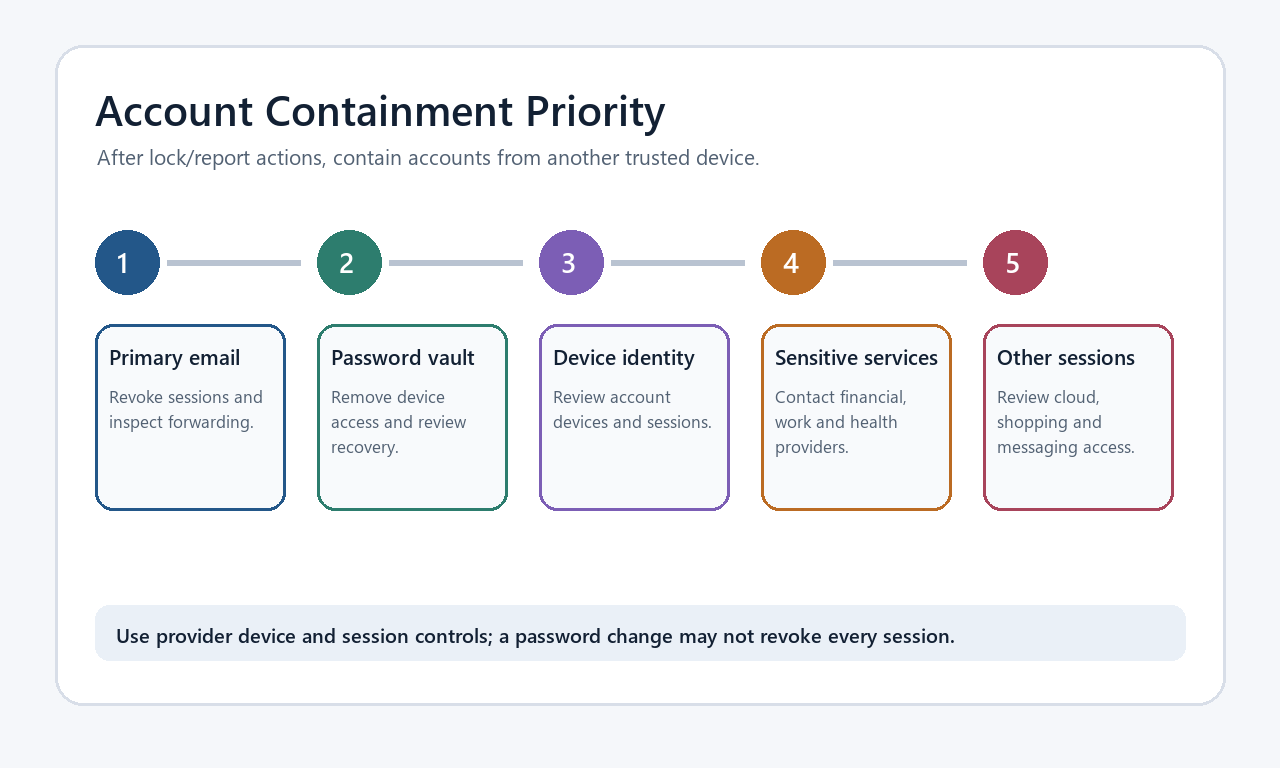
Remote locking protects the device boundary. Account revocation protects the cloud boundary. Complete both.
- Primary email: review sessions, use sign-out-everywhere where offered, change the password from the trusted device, verify recovery methods, and inspect forwarding, filters, delegates, and sent/deleted mail.
- Password manager: revoke the missing device or sessions, rotate the account password if recommended, verify MFA and recovery, and rotate high-value credentials if an unlocked vault may have been accessible.
- Apple, Microsoft, or Google account: review devices, security events, recovery factors, app passwords, passkeys, connected apps, and payment activity.
- Financial, tax, health, government, and work accounts: call providers through official numbers when sensitive records or active sessions were accessible. Do not wait for map certainty if money moved.
- Messaging, shopping, development, and cloud storage: revoke sessions and tokens, then inspect sharing, downloads, API keys, purchases, addresses, and messages.
The FTC recommends changing the password, signing out all devices, enabling two-factor authentication, checking recovery information, and reviewing forwarding or sent messages (FTC). Google similarly separates recent security-event review, device review, recovery, and harmful-software response (Google). Apple tells users who suspect compromise to correct unknown security information and remove devices they do not recognize (Apple). These account controls do not prove local files were unread.
For a provider-by-provider sequence, use the session-cookie theft recovery plan. Email persistence deserves the hidden-forwarding recovery checklist. After the incident, build a family recovery binder without shared passwords. If a phone or authenticator was in the same bag, follow the authenticator migration plan before removing it.

Set a bounded wait window
“Wait and see” needs a deadline and stop conditions. A household may permit a short window—such as the venue’s next lost-property processing cycle—when location remains at a controlled site, encryption was confirmed, the laptop was probably locked, and account containment is complete. This is not a universal 24-hour rule. Confirmed theft, a moving location, missing encryption, exposed client data, or active misuse can justify immediate escalation.
Before requesting erase, confirm:
- the correct device is selected, especially when names are similar;
- screenshots, times, serial number, and police or venue case IDs are saved elsewhere;
- critical files have an independent backup or confidentiality risk justifies losing the only copy;
- sessions and recovery factors are contained from a trusted device;
- the effect on location tracking is understood for that platform;
- an employer, insurer, attorney, or law-enforcement contact has not instructed you to preserve state.
After requesting erase, preserve the confirmation and check whether it is pending or completed. Never describe a queued offline command as a completed wipe. Do not remove a device from an account merely to tidy the dashboard until you understand whether removal disables tracking, activation protection, or the queued erase.
Prepare now so the next loss is smaller
- Enable the supported find/lock feature and confirm the device appears in your account.
- Confirm full-disk encryption, then store its recovery key outside the laptop and its everyday bag.
- Use a strong login password, automatic screen lock, and short idle timeout.
- Enable MFA on email, password manager, cloud storage, and financial accounts. CISA recommends MFA because it adds another identity check beyond a password (CISA). Keep recovery methods independent of one bag or device.
- Maintain a versioned backup and perform a sample restore. Sync can mirror deletion or corruption; a recoverable copy is more useful than a green sync icon.
- Inventory serial number, model, receipt, insurer details, and support contacts without storing all of them only on the laptop.
- Minimize local copies of identity documents, client exports, private keys, and browser downloads. Retention creates exposure.
- Avoid leaving the password manager or sensitive sites indefinitely unlocked. Reauthentication for high-value actions can reduce damage if the laptop is taken while awake.
The objective is not to guarantee recovery or prove that no one viewed a file. It is to keep a physical loss from becoming an uncontrolled account takeover: preserve facts, avoid unsafe confrontation, use vendor controls accurately, revoke cloud access, understand encryption, and make irreversible choices only with explicit evidence and stop conditions.